Sharing a single file from object storage allows you to securely share an individual file with users without exposing the entire folder. This document explains how to create a single file share, configure access permissions, and share it with users.
New Share
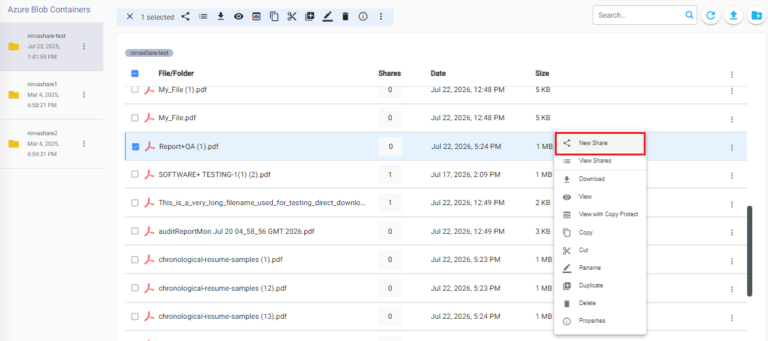
From the NirvaShare Admin Console, click Storage from the left menu and browse to the required file. Right-click the file and select New Share.
Basic Info
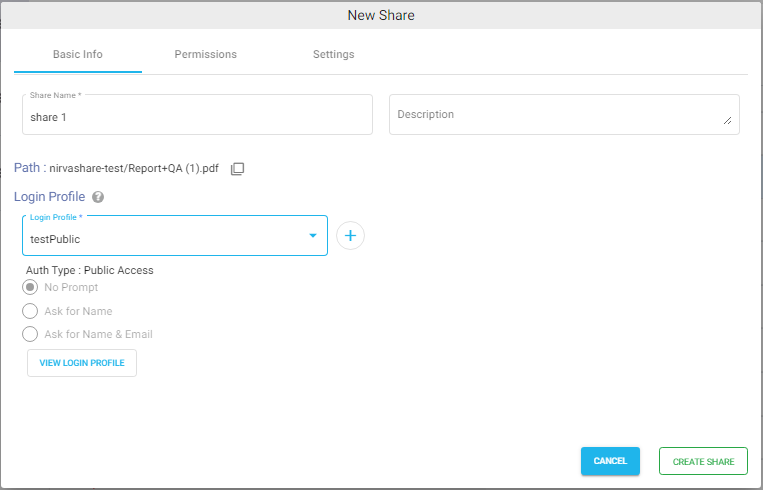
Provide a Share Name and Description for the file share.
Login Profile
Authentication for the shared file is configured using a Login Profile. Select the required login profile from the Login Profile dropdown. For more information about creating and managing login profiles, refer to the Login Profile documentation.
Move to the next tab to configure the share Permissions.
Permissions
Configure the required access permissions. For more information, refer to the File Share Permissions documentation.
Settings
Configure the Validity Period, if required. For more information, refer to the Share Validity Period documentation.
Click Create Share to create the new share.
Ready to Share
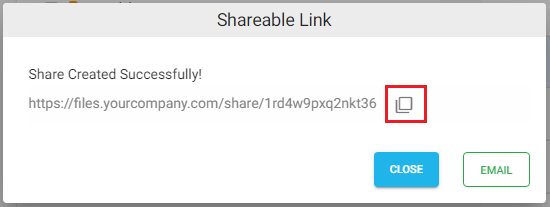
Once the share is created, the Shareable Link pop-up appears. You can copy the Shareable Link or send it directly through email.
When users open the Shareable Link, they are prompted to authenticate using the configured Login Profile. After successful authentication, they can access the shared file based on the assigned permissions.