< All Topics

Configuring OnlyOffice Service

The OnlyOffice Service can be integrated with NirvaShare to view and edit Microsoft Office documents. This document explains how to configure the OnlyOffice Docker Service for use with NirvaShare.

Prerequisites

Before configuring OnlyOffice, ensure the following prerequisites are met:

NirvaShare is installed either on the cloud or on premises. For installation instructions, refer to:

The OnlyOffice Docker Service is installed and ready for integration with NirvaShare.

Enable OnlyOffice Docker Service

Follow these steps to configure the OnlyOffice Docker Service:

  • Log in to the Admin Console as a Super Administrator.
  • From the left menu, click Settings.
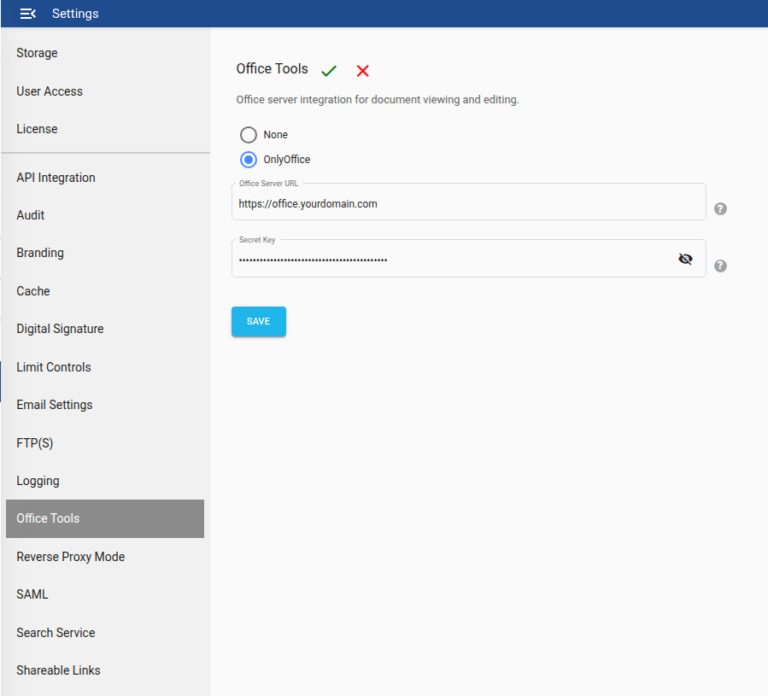
  • Click Office Tools, and then click Edit.
  • Select OnlyOffice.
  • In the Office Server URL field, enter the URL obtained after installing the OnlyOffice Docker Service.
  • Enter the Access Token obtained during the Office Server installation.
  • Click Save to apply the changes.
onlyoffice
Table of Contents