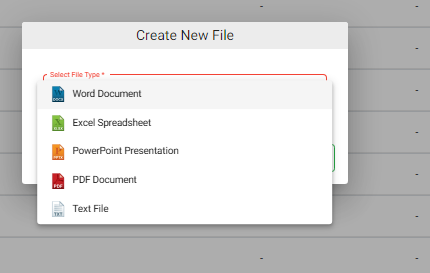
NirvaShare allows administrators and users to create new Office documents, spreadsheets, presentations, PDF documents, and text files directly in Storage without uploading an existing file.
Prerequisites
Before creating files, make sure the Office Tool is configured in NirvaShare.Refer to Configuring OnlyOffice Service for setup instructions.
Admin Console
To create a new file:
Log in to the NirvaShare Admin Console.
Navigate to Storage.
Click Create New File.
Select the required file type from the dropdown.
Provide a name for the file and click Create.
The newly created file opens in edit mode, allowing you to add or modify its content. Note: Ensure that the administrator has both Can Upload and Can Edit permissions enabled to create and edit files.
User Application
Users can also create new files from the User Application. The administrator must enable the required Upload and Edit permissions for the user’s share. To create a new file:
Log in to the NirvaShare User Application.
Navigate to the required shared folder.
Click Create New File.
Select the required file type from the dropdown.
Enter a name for the file.
Click Create.
The new file opens in edit mode, allowing the user to add or modify its content. Note: The available file operations depend on the permissions granted by the administrator.