Multiple Shares can be created with different authentication mechanisms, and each share has a unique URL for sharing files with users. However, it is also possible to configure a default Login Profile for the User Application that can be accessed using only the domain name without any additional parameters. For example: https://files.yourdomain.com
When a user opens the User Application using only the domain name without a full Share URL, the default Login Profile configured here is prompted for authentication.
Follow these steps to configure the Default Login Profile:
Log in to the Admin Console.
From the left menu, click Settings, and then select ShareableLinks.
Click Edit to modify the Default Login Profile.
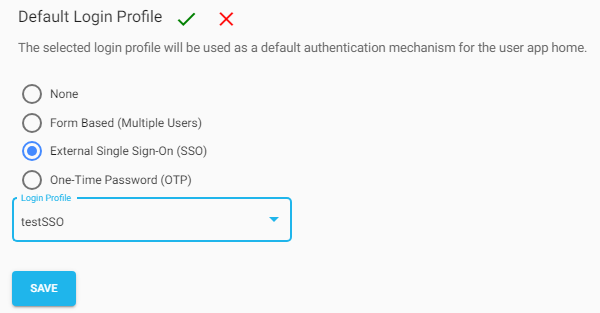
Choose the Login Profile type, either ExternalSSO or OTP–Based or Form-Based (Group of Users). Select None if you do not want to configure a default Login Profile for the User Application.
Based on the selected Login Profile type, the associated Login Profiles are listed. Select the required Login Profile and click Save.
The selected Login Profile becomes the default authentication mechanism for the User Application home page. After successful authentication, users can access all the Shares associated with the configured default Login Profile.