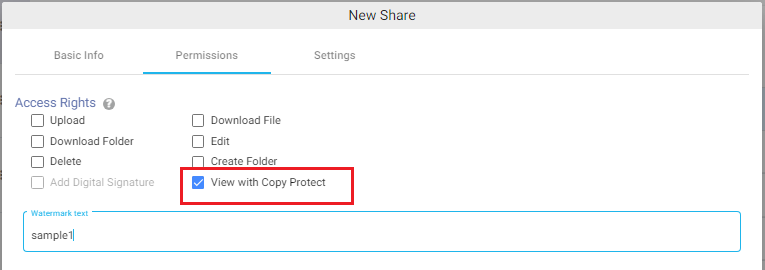
Copy Protection allows administrators to securely share supported documents while preventing users from copying, downloading, or redistributing the content. Users can view the document in the browser but copy and download actions are restricted.
Copy Protection is useful when sharing confidential documents such as contracts, financial reports, policies, or other sensitive information.
Supported File Types
Copy Protection is supported for the following document types:
PDF
DOCX
PPTX
Enabling Copy Protection
To enable Copy Protection:
Create or edit a file/folder share.
Navigate to the Permissions tab.
Select the View with Copy Protect checkbox.
(Optional) Configure a watermark for the document.
Click Create Share or Save.
How It Works
When users open the Shareable Link and authenticate successfully, the document opens in the browser using the secure document viewer.
Users can:
View the document.
Navigate through the document pages.
Users cannot:
Download the document.
Copy text or content from the document.
Redistribute the protected document.
Watermark
An (optional) watermark can be added to copy-protected documents. The watermark is displayed while viewing the document to help discourage unauthorized sharing or screenshots.
Notes – Copy Protection is available only for PDF, DOCX, and PPTX files. When View with Copy Protect is enabled, the Download File permission is automatically disabled. Email alerts for View are supported when a copy-protected document is viewed.