Amazon Web Services (AWS) offers S3 Glacier and S3 Glacier Deep Archive for secure and cost-effective long-term data storage. NirvaShare integrates with these storage classes, allowing you to archive and restore files easily. This document explains how to configure AWS S3 Glacier storage in NirvaShare.
Storage Configuration
The obtained access credentials must be configured in NirvaShare to enable access to the storage. Follow the steps outlined below to complete the setup.
Login to The Admin Console of NirvaShare.
Click on Settings in the left menu then Select Storage.
Edit the File Storage under the settings page.
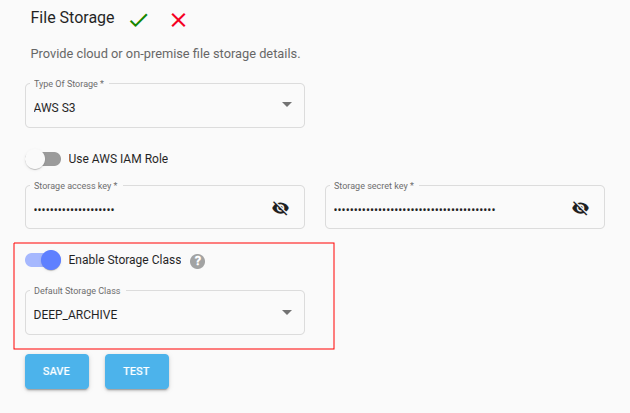
Make sure the storage selection is AWS S3 and required credentials are provided.
To allow integration with Archive Storage, enable the checkbox Enable Storage Class.
Select the desired default storage class.
Click Save.
Notes
The selected storage class will be used as the default storage type for all file uploads from NirvaShare.
Admin users have the ability to override and select a different storage class during file upload from the Admin Console.
End users do not have the option to choose the storage class; the configured default will be applied automatically.